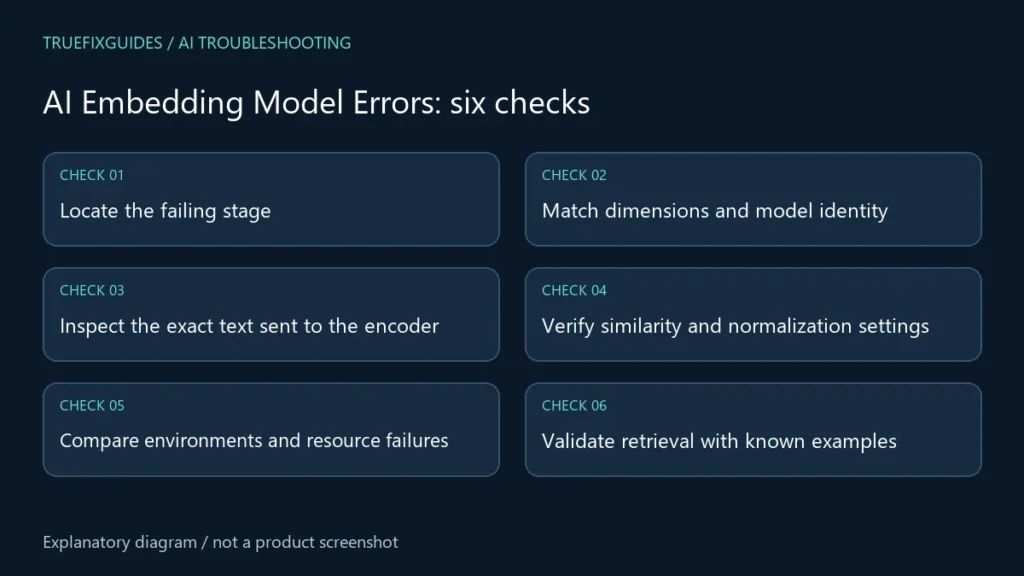
AI embedding model errors can stop a request, reject a vector at the database, or silently reduce retrieval quality. Separate those symptoms before changing the model. Start with one small input, record the embedding model and configuration, and follow the result from generation through storage to the final search result.
1. Locate the failing stage
Check whether the problem occurs during model loading, encoding, API access, vector insertion, or search. Record the exact error and the smallest input that reproduces it. Remove private document content and credentials from a support example.
Sentence Transformers documentation describes fixed-size vector representations and the basic encoding workflow. Use a small controlled example to separate application integration from the underlying encoder. AI embedding model errors that appear only after storage should be investigated differently from a model that cannot load at all.
2. Match dimensions and model identity
Compare the returned vector length with the collection or index schema. Also compare model identifier, revision, preprocessing, and any supported dimension setting. Equal dimensions do not establish that two models produce compatible vector spaces.
If the embedding model changes, plan a new index or a complete controlled re-embedding process rather than mixing incompatible vectors. Keep the old index available until the replacement is verified. AI embedding model errors can persist even when insertion succeeds, because a query encoded with a different model may retrieve poor results without raising an exception.

3. Inspect the exact text sent to the encoder
Check for empty strings, repeated placeholder text, lost document sections, incorrect character decoding, and accidental duplication. Inspect the transformed input rather than only the original document. A bug before encoding can make different documents arrive as the same text.
Read the selected model’s documentation for length limits and recommended input formatting. If chunking is needed, preserve source identifiers and enough context to interpret each chunk. For AI embedding model errors involving missing information, test a known detail near the end of a source to see whether it survives preprocessing.
4. Verify similarity and normalization settings
Confirm which similarity function the model workflow and vector database use, and whether normalization is expected. Cosine similarity, dot product, and distance measures are different operations. Check score ordering too: some interfaces return similarity, while others return a distance where smaller is better.
The Sentence Transformers similarity guide illustrates comparing encoded text. Use a few deliberately related and unrelated sentences to inspect your own pipeline. AI embedding model errors should be diagnosed with ranked examples, not a universal score threshold borrowed from another model.
5. Compare environments and resource failures
Record package versions, device, numeric precision, model revision, and download source. If outputs contain non-finite values, isolate the encoder from the rest of the application and reproduce the result with a small input. Do not assume every numerical problem means the downloaded file is corrupt.
For API failures, inspect the provider’s error category and retry guidance. For local failures, check resource errors and supported runtime requirements. Our environment mismatch guide helps compare deployments. Keep AI embedding model errors separate from database permission or network failures.

6. Validate retrieval with known examples
Create a small evaluation set containing queries and the source passages they should retrieve. Check the top results, source IDs, filters, and chunk text. Include some queries that should have no useful match so the application does not treat every nearest neighbor as relevant.
After a correction, rerun the same examples and compare results with the previous configuration. Record remaining failures. Our model accuracy guide covers broader evaluation concerns. Resolve AI embedding model errors by verifying generation, storage, and retrieval together.
Verification checklist
Keep the model identifier, revision, vector dimension, preprocessing, similarity metric, and index version in the deployment record. Test a known query after every significant change. A useful AI embedding model errors report includes the failed stage and a small redacted example, not only a screenshot of an unrelated search result.
Frequently asked questions
Can I mix vectors from models with the same dimension?
Not merely because their lengths match. Their learned spaces may be incompatible. Keep model identity and preprocessing consistent, and verify a migration in a separate index.
Do all-zero or repeated vectors prove a corrupt model file?
No. Inspect input preprocessing, numeric behavior, pooling or integration code, and model loading. Use a minimal reproduction and the model documentation to establish the actual cause.
Editorial note: Revised with AI assistance using the linked primary sources, reviewed October 24, 2026. Diagrams explain the workflow; no hands-on testing of a specific system is claimed.