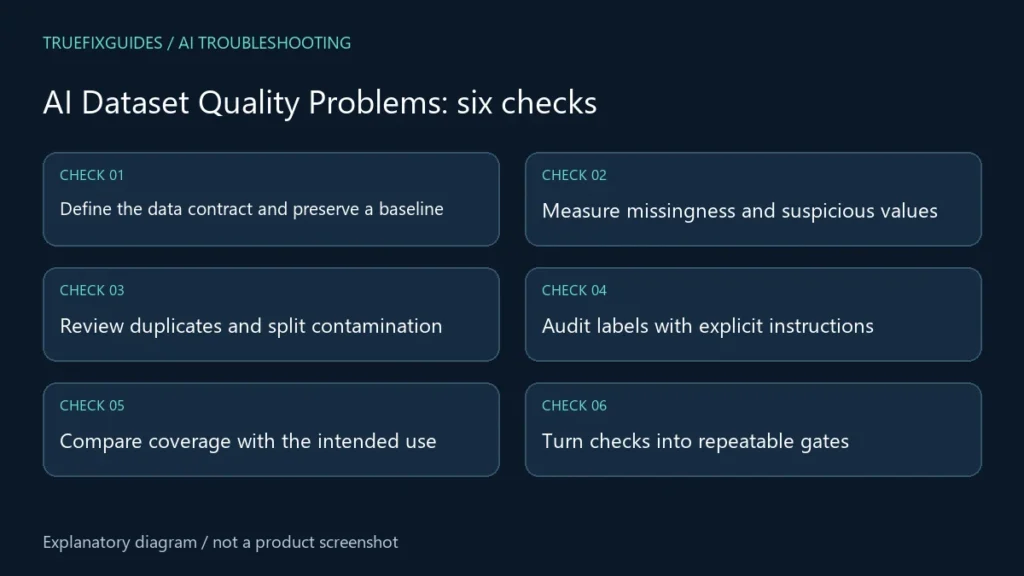
AI dataset quality problems can come from broken records, inconsistent labels, missing coverage, or data that does not represent the intended task. More data does not automatically repair these issues. Start with a versioned dataset and a clear definition of what each row, field, and label is supposed to mean. Preserve the raw version so every correction can be traced, compared and reversed.
1. Define the data contract and preserve a baseline
Write down the unit represented by one record, required fields, types, allowed values, and source. Record when the data was collected and when each field becomes available. Keep an unchanged copy so a cleaning decision can be reviewed or reversed.
For AI dataset quality problems, choose a small set of representative records to inspect manually. Include ordinary cases, rare cases, and known failures. A schema check is useful, but it cannot tell you whether a label or measurement has the right real-world meaning.
A useful data contract answers practical questions: What counts as one example? Can a customer or device appear more than once? Which system produced each field? What does a missing value mean? When was the value known? What version of the labeling instructions was used? Without these definitions, a “clean” table can still describe the wrong task.
For AI dataset quality problems, keep the original export read-only and make corrections in a reproducible transformation. Record row counts and a checksum or immutable version identifier before cleaning. Sample records from each source and time period, not just the first rows. This makes it possible to explain why a new release behaves differently from the previous one.
2. Measure missingness and suspicious values
Calculate missing values by field and by relevant source or time period. Check ranges, units, impossible dates, and placeholder strings. A column may be technically non-null while containing empty strings or values such as “unknown.”
pandas isna documentation explains what its missing-value check detects. Define additional checks for your own conventions. Do not automatically delete every incomplete record: first investigate why values are missing and whether removal would distort coverage. Keep the number and reason for each change in the AI dataset quality problems log.
Check missingness both globally and by segment. If only one device type or collection month lacks a feature, filling every missing value with the same default can hide a pipeline outage. Inspect explicit nulls, empty text, sentinel numbers and strings such as “unknown.” Verify units before setting thresholds; 5 seconds and 5 milliseconds should not be treated as the same measurement.
When AI dataset quality problems involve imputation, choose a rule that reflects the data and fit learned imputation values on training data only. The scikit-learn imputation guide describes available strategies and missing-value indicators. Compare before-and-after counts and evaluate whether removing incomplete records would disproportionately exclude an important group. Preserve the reason for the choice rather than declaring one universal strategy.

3. Review duplicates and split contamination
Identify exact duplicates using a documented key, then inspect near-duplicates and repeated entities. Two rows about the same person are not necessarily duplicate mistakes, but they may need to remain together during evaluation. A repeated export can create a different problem from legitimate repeated observations.
pandas duplicated can flag matching rows or selected columns. Review flagged records before removal. AI dataset quality problems involving duplicate content can inflate evaluation results when copies land on both sides of a split. Save the split assignment and the deduplication rule together.
Start with exact duplicate keys and byte-identical content, then check near-duplicates using a method suited to the data. A copied support ticket with a new ID, a resized photo and a paraphrased document can all cross a split undetected by exact-row matching. Review the source before deletion: repeated measurements may be legitimate and necessary for the task.
AI dataset quality problems can turn into evaluation leakage when the same underlying event appears in training and test data. Group related records before splitting when deployment will encounter new entities. The Google dataset-splitting lesson illustrates how duplicate examples can make a test set look more representative than it is. The AI data leakage guide covers the boundary audit in more detail.
4. Audit labels with explicit instructions
Sample labels across classes, data sources, and difficult cases. Ask reviewers to apply the same written instructions and capture disagreements. When disagreement reflects ambiguity in the task, update the definition rather than simply choosing the majority label.
Keep original labels, corrected labels, reviewer notes, and guideline versions traceable. Avoid changing labels solely because a model disagrees with them; the model may be wrong. To diagnose AI dataset quality problems, distinguish obvious annotation mistakes from uncertainty, inconsistent policy, and cases that require specialized domain review.
Use a small audit sample with clear selection rules: include common cases, rare labels, recent data and records where model and reviewer disagree. Ask two reviewers to explain the evidence for difficult labels before changing them. A high disagreement rate can indicate vague instructions or a task that requires a different outcome definition. Record unresolved cases rather than silently forcing a label.
For AI dataset quality problems in labeled data, compare error rates by source and labeling period. A policy change may create different labels for the same underlying behavior. Keep old and revised instructions with the dataset version. The Google data-quality guide recommends documenting corrections so downstream users understand what changed.
5. Compare coverage with the intended use
Compare the dataset with the conditions the system will encounter: language, device, environment, time period, or relevant user groups. Report sample counts and known gaps. A large dataset can still miss a rare but important condition.
Class imbalance is not automatically a defect; it may reflect the real setting. Choose metrics and any training adjustments according to the task, and keep evaluation representative of intended use. AI dataset quality problems should be described precisely rather than reduced to a universal instruction to balance every class or remove every outlier.
Create a coverage table for conditions that matter to deployment: source, time window, language, device, region or another relevant group. Include counts, label rates and missingness. Compare those values with the expected production population. A dataset can be large overall but have almost no examples of the situation the model is meant to handle.
AI dataset quality problems may be caused by selection bias. For example, a support dataset containing only users who contacted support cannot automatically represent all product users. Describe the sampling process and known exclusions. Do not fabricate a balanced dataset to improve an evaluation score; choose a test population that matches the actual decision and disclose gaps where evidence is thin.

6. Turn checks into repeatable gates
Run the same validation checks on each new dataset revision. Separate failures that block a release from warnings that require review. Record changes in schema, missingness, label distribution, source mix, and coverage with enough context to explain them.
After cleaning, rerun a fixed evaluation and inspect important error cases. A better score alone does not prove the dataset is better. Our model accuracy guide can help separate data issues from modeling choices. Track AI dataset quality problems with an owner, evidence, and a verified correction.
Turn the manual audit into a small set of checks that run on each release: required columns, permitted types, unexpected null-rate changes, duplicate-key counts, impossible values, label distribution and source coverage. Decide which failures stop a release and which open a review. Choose thresholds from historical data and task impact, then revisit them when collection changes.
When AI dataset quality problems are found, rerun the fixed evaluation on a preserved holdout after cleaning. Compare error examples as well as aggregate metrics. A higher score may reflect leakage, a different sample or a genuine correction. Keep a change log with who reviewed the issue, what rule changed, which rows were affected and how the new dataset was verified. For feature timing and preprocessing checks, use the AI feature engineering guide.
AI dataset quality problems: decision table
| Signal | First check | Safe action |
|---|---|---|
| Missing values spike in one source | Collection pipeline and placeholder conventions | Fix the source or document a justified imputation rule |
| Test score is surprisingly high | Duplicate content and shared entities | Rebuild the evaluation split |
| Labels disagree across reviewers | Written instructions and ambiguous cases | Clarify the definition and relabel a tracked sample |
| Model fails for a new group | Coverage and error counts by group | Collect representative data and reassess the task |
| Cleaning improves a metric sharply | Rows removed and split contamination | Verify on an independent, unchanged holdout |
Use a concrete source record to confirm the cause. AI dataset quality problems often overlap, so one check may not explain every failure.
Verification checklist
Before approving a dataset, confirm its schema, provenance, missing-value conventions, duplicate rules, label instructions, and evaluation split. Keep before-and-after counts and a reversible change record. A useful AI dataset quality problems report states which defects were corrected, which limitations remain, and which tests will detect a recurrence. Keep the AI dataset quality problems report attached to the next dataset release.
Frequently asked questions
Should every outlier be removed?
No. An outlier may be a measurement error or a legitimate rare event. Inspect its origin and task relevance, document the decision, and check how removal changes coverage.
Does adding more rows fix poor dataset quality?
Only if the new rows are relevant and accurately collected. Repeating the same mislabeled or unrepresentative examples can increase dataset size without improving the evidence the model needs.
Should missing values always be imputed?
No. The choice depends on why values are missing, their meaning and the model’s expected inputs. Compare a documented strategy under a clean training and evaluation split.
Can automated validation replace label review?
No. Automated rules can catch structural problems and flag unusual records. They do not resolve every ambiguous label or decide whether the task definition matches the real outcome you care about.
Editorial note: Revised with AI assistance using the linked primary sources, reviewed November 23, 2026 against current Google and scikit-learn guidance. Diagrams explain the workflow; no hands-on testing of a specific system is claimed.