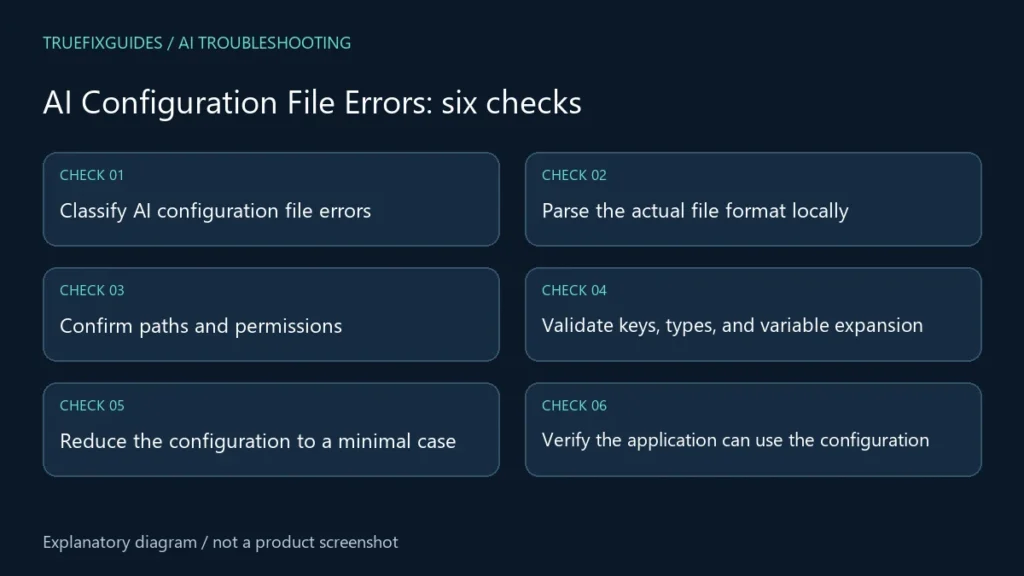
AI configuration file errors can happen before parsing, while parsing, or after the application reads a value it cannot use. Identify that stage first. A missing file, malformed YAML, unsupported setting, and unavailable model path need different fixes, even when they all prevent the same application from starting. Start by preserving the exact error and checking which file the running process actually opened; do not edit the first file with a familiar name and assume it is active.
1. Classify AI configuration file errors
Save the exact error, the command used to start the application, its version, and the intended configuration path. Note whether the application reports a missing file, a parser location, an invalid field, or a later runtime failure. Work on a copy under version control where possible.
Preserve secrets while investigating. Do not upload a real configuration containing tokens, passwords, or private endpoints to a public validator. Create a redacted example that still reproduces the failure. Keep the last working configuration so each change can be compared with a known baseline. For AI configuration file errors in production, copy the failure message and timestamp before restarting a service; repeated restarts can overwrite the log entry that identifies the first failure. If a service has a last-known-good configuration, keep it available for rollback while you test a candidate in a safe environment.
If the error names a line and column, inspect that location and the lines immediately above it. A missing closing bracket or an indentation mistake can be reported after the place where it began. If the error names a missing resource instead, parsing may already have succeeded. That distinction prevents a syntactic rewrite from hiding a path or permission problem.
2. Parse the actual file format locally
Use a parser for the format your application expects. Python’s JSON module can read JSON; PyYAML provides safe_load for standard YAML tags. Python bytecode compilation is not a YAML validator.
For a small trusted JSON file, this local check parses without printing its values:
import json
from pathlib import Path

with Path("config.json").open(encoding="utf-8") as stream:
    json.load(stream)
print("JSON parsed successfully")
For YAML, use a local parser in an environment where PyYAML is already installed. This small example reads a trusted local file without printing its contents:
from pathlib import Path
import yaml

with Path("config.yaml").open(encoding="utf-8") as stream:
    yaml.safe_load(stream)
print("YAML parsed successfully")
The command only confirms that the file can be parsed with that library. If the application accepts multiple YAML documents, use its documented behavior rather than assuming safe_load handles the whole stream. Do not install an untrusted parser or send a secret-filled file to a public website simply to run a syntax check. For AI configuration file errors, make sure the format, filename and parser match what the actual application expects.
Successful parsing only checks structure. AI configuration file errors can remain when the application requires fields or value types that the document does not provide.

3. Confirm paths and permissions
Check which file the running process actually opens. Relative paths depend on the process’s working directory, which may differ between a terminal, service, container, and scheduled job. Compare the resolved path with the file you edited. For AI configuration file errors on a service or container, distinguish a path on the host from a path inside the runtime. A file present on a developer laptop will not appear in an image unless it was copied or mounted into that environment. Record the working directory and the exact resolved filename without publishing private paths or credentials.
If the file exists but the application reports access denied, inspect ownership and permissions under the service identity. Test a read operation with that identity where safe. Do not make the file world-readable or grant administrator rights just to make an error disappear. A file can be readable while a referenced model checkpoint or certificate remains inaccessible; follow the resource named by the first meaningful error.
Verify read access using the same account that runs the application. For containers, check the mount and the path inside the container. Do not solve a read problem by granting unrestricted permissions. AI configuration file errors involving a checkpoint or dataset path may occur after the configuration itself has loaded successfully, so inspect the referenced resource separately.
4. Validate keys, types, and variable expansion
Compare the file with documentation for the installed application version. Check required keys, permitted values, nesting, and value types. A quoted number may be a string when the application expects an integer. A correctly spelled setting can still belong to a different version. Check the application’s documented schema or validation command for the installed release. The JSON Schema guide explains how a schema validates a document’s required properties and types; parsing alone cannot do this.
For AI configuration file errors involving numbers or booleans, compare the actual data type with the documented type. In JSON, "false" is a string while false is a boolean. In YAML, indentation changes which parent owns a setting. Keep a minimal copy and modify only one value at a time, then rerun the application’s own validator. A warning about an unknown key may mean the key was removed or renamed in the installed version, not that the YAML parser failed.
Environment-variable expansion is an application feature, not an automatic property of every YAML or JSON parser. Confirm whether placeholders are supported and which process supplies their values. For AI configuration file errors, log the presence of a required variable without printing its secret value. Inspect the application’s effective settings only through an appropriately redacted view. If a variable appears unset, check whether it exists for the actual service process, not only for your interactive shell. Container secrets and CI variables may be mounted or injected differently. For AI configuration file errors that appear only after deployment, compare the rendered configuration and variable names across environments without copying secret values into logs.
5. Reduce the configuration to a minimal case
Start from the smallest documented configuration for the installed version. Add one section at a time and rerun the same harmless startup or validation check. Keep notes on the first addition that reproduces the failure. If the application offers a dry-run or validate command, use it before a production restart. A successful generic JSON or YAML parse is not enough: the application’s schema can reject an obsolete key, invalid model identifier or incompatible combination of options. Avoid copying a configuration example for a newer software version into an older installed runtime.
For AI configuration file errors in version control, review the smallest diff between the last working revision and the candidate. Revert one suspicious change in a test environment, rerun the same validation, and record whether the exact error disappears. Preserve other valid changes rather than discarding a whole release without understanding what actually failed.
Avoid reinstalling or downgrading dependencies as the first response. If compatibility is implicated, reproduce it in an isolated environment and compare package versions with the project’s requirements. This keeps AI configuration file errors from turning into a wider environment problem. Our dependency troubleshooting guide covers that separate branch of the investigation.
6. Verify the application can use the configuration
After parsing and validation pass, run a small operation that uses the relevant settings. Confirm that the intended model, paths, and environment are active. A successful startup alone may not exercise an optional feature or a later job stage. Send a harmless request or run a small job that uses the corrected model path or option. Verify expected output and the active version. If the service starts but a model cannot load, the configuration parser is no longer the primary failure; follow the model artifact or permission evidence.
For AI configuration file errors corrected in a shared repository, add a validation command to the development or deployment workflow when practical. Keep any example configuration free of live credentials. A check that can be run before rollout catches the same class of error without relying on a user to notice a broken production endpoint.
Save the corrected file, application version, and validation result. Document any deployment-specific values separately from shared defaults. For recurring AI configuration file errors, add a startup validation step that fails clearly without exposing secrets. Our environment mismatch guide helps compare local and deployed behavior.
AI configuration file errors: diagnostic decision table
| First useful evidence | Likely stage | Next safe check |
|---|---|---|
| No such file or directory | Discovery or path | Confirm the resolved path and mount under the service identity |
| Line and column parse error | JSON or YAML syntax | Parse a local redacted copy and inspect nearby delimiters or indentation |
| Unknown key or wrong type | Schema validation | Compare the installed application’s version and documented schema |
| Missing environment value | Variable injection | Check whether the running process receives the variable name |
| Model or dataset path fails after startup | Referenced resource | Check the artifact, permissions and runtime path separately |
This table is a starting point, not a universal mapping of error strings. For AI configuration file errors, the same visible message can be wrapped by a framework; inspect the earliest underlying exception and the application’s own documentation before changing production settings.
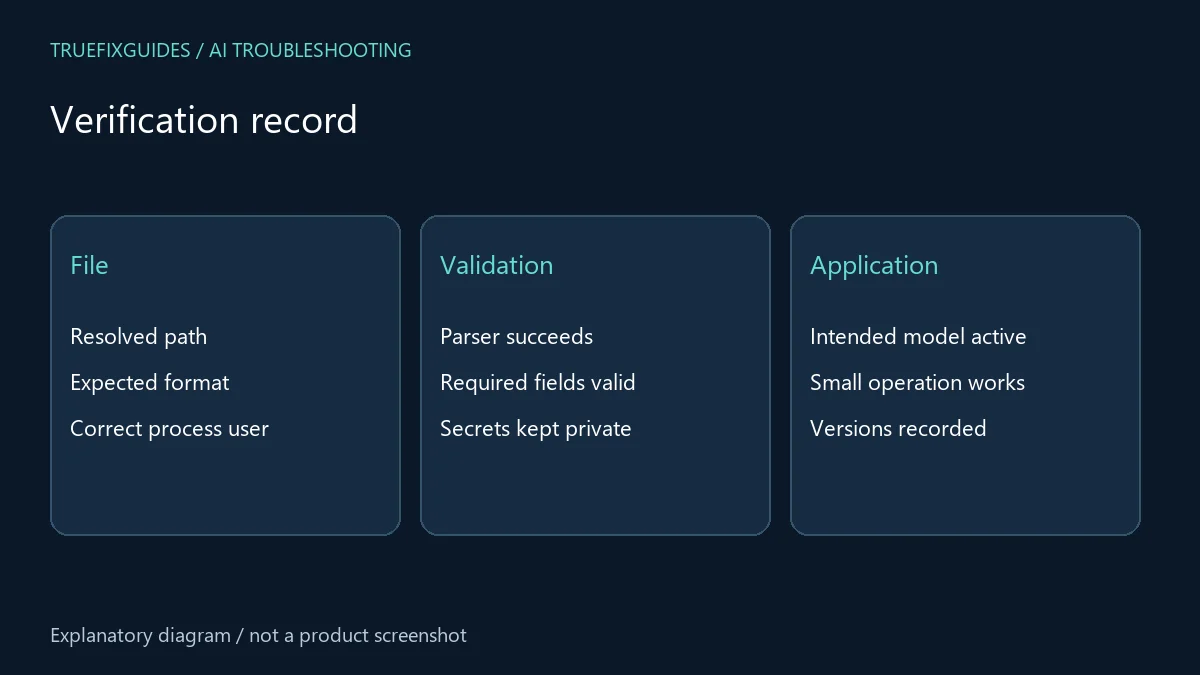
Verification checklist
Before closing the issue, identify the file actually read, confirm its parser succeeds, validate required fields, and run a small application operation. Keep secrets out of diagnostic output. A complete AI configuration file errors report states the failing stage, minimal reproduction, and precise change that corrected it. Verify that the repaired version survives a clean restart and that the old error does not return. If the change only works because a secret was copied into the file, undo that approach and use the application’s supported secret-management method.
Frequently asked questions
Does safe YAML parsing validate my application settings?
No. Safe parsing limits how YAML is interpreted, but your application still needs schema and semantic checks. A parsed file can contain an unsupported model name, wrong field type, or inaccessible path.
Why does the file work in one terminal but fail in a service?
Compare working directory, runtime user, mounted files, package versions, and environment variables. These can differ even when the visible configuration file is identical.
Editorial note: Reviewed November 23, 2026 against Python, PyYAML and JSON Schema documentation. Diagrams explain the workflow; no hands-on testing of a specific deployment is claimed.